

Oilfield and production water hauling
Water hauling dispatch software from work order to invoice
Built for the realities of oilfield and production water hauling: jobs that change mid-shift, lease roads that GPS gets wrong, and tickets that have to match what gets billed.
Free trial, no credit card required. Already a customer? Fleet Manager Login
Why water haulers switch
The problems Strait Dispatch was built around
Strait Dispatch began with oilfield liquid haulers in 2018. These are the handoffs they needed fixed.
Paper tickets
Tickets that get lost, arrive late, or cannot be read hold up billing for days.
Job changes
When a pickup or disposal changes, drivers and the office need the same update at the same time.
Uncertain truck status
Without live location and status, dispatch makes calls to find out who is loaded, en route, or idle.
Route restrictions
Consumer GPS sends trucks down restricted or damaged lease roads.
Missing documentation
Changes made by phone leave no record of who changed what, or why.
Slow audit-to-invoice
Billing staff rebuild each load from paperwork before anything can be invoiced.
Workflow
How a water hauling job moves through Strait Dispatch
Dispatch assigns
The work order goes to a driver with pickup, disposal, and any custom route.
Driver completes
The driver accepts, completes the JSA, loads, unloads, and records the ticket in the app.
Location stays visible
Dispatch sees status and location, and every stop is timestamped.
Office audits
Billing reviews the ticket and the work order journal and corrects in bulk when needed.
Billing uses approved records
Invoices are created from audited work orders, not retyped tickets.
Water hauling screens
Fleet and dispatch
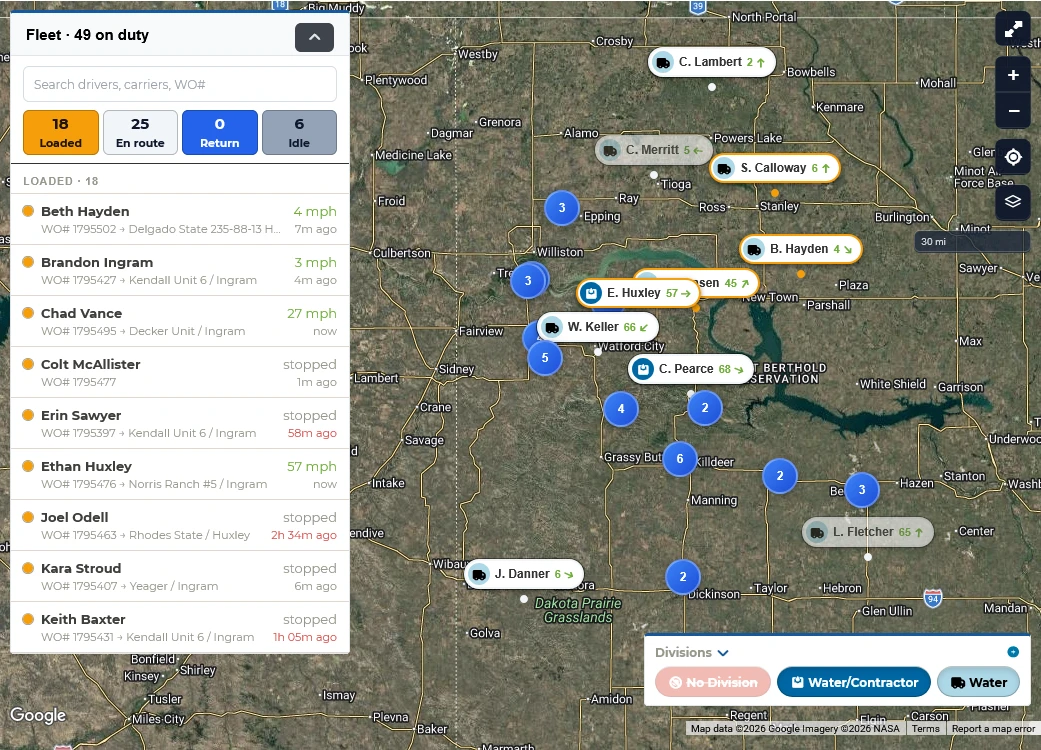
Every driver, load, and status on one screen
See who is loaded, en route, returning, or idle, with each driver’s current work order and speed beside the map. Divisions show in their own icons and colors, so dispatch can make the next assignment, cover a breakdown, or answer a customer without a phone call.
Driver Day Board
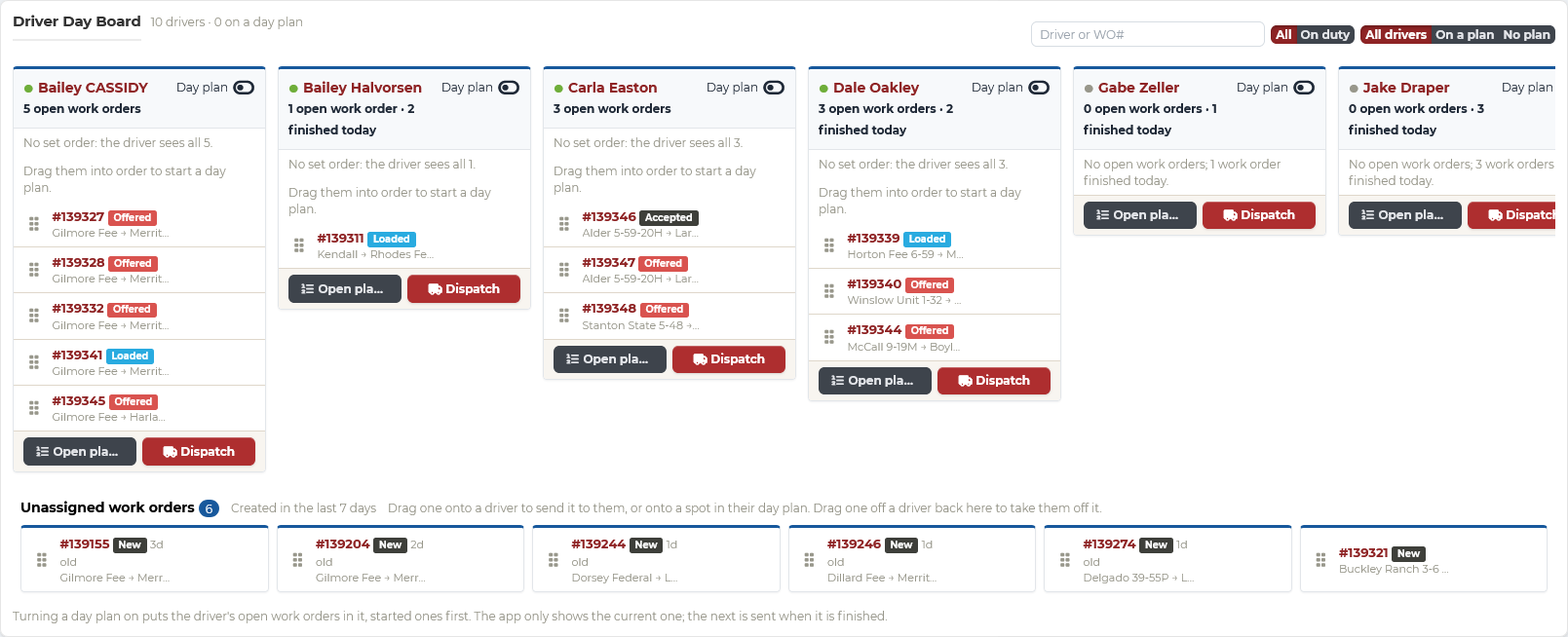
Plan each driver’s day, and change it as the field changes
Line up each driver’s loads for the day, then drag work orders onto, off of, or between drivers when a well comes up early, an SWD backs up, or a truck goes down. Turn on a day plan and the driver sees only the current load, with the next sent as soon as they finish, so loads run in the order you set. Every change reaches the driver’s app right away.
- Queue each driver’s loads in the order you want them run
- Day plans, per driver: show only the current load, and send the next when it is finished
- Unassigned work orders waiting to be placed
Digital tickets and job timeline
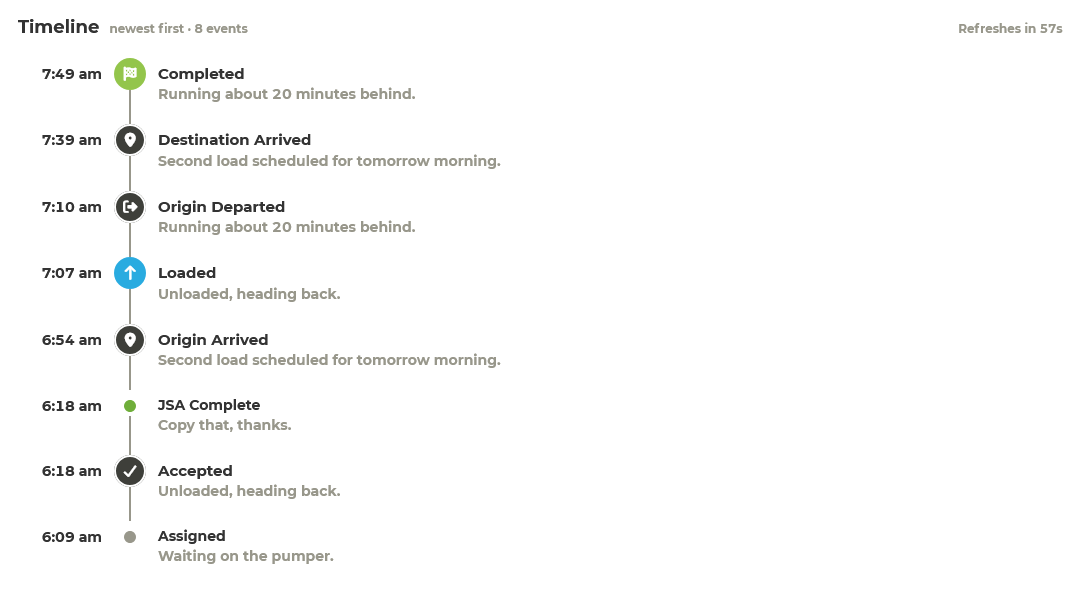
Every step of the job recorded in the field
Drivers accept the job, complete the JSA, and record loaded, arrived, and unloaded in the Driver app, with notes along the way. Each step lands on the work order timeline the moment it happens, so there is no paper to chase before auditing.
Driver accountability
Know where every truck spent its shift
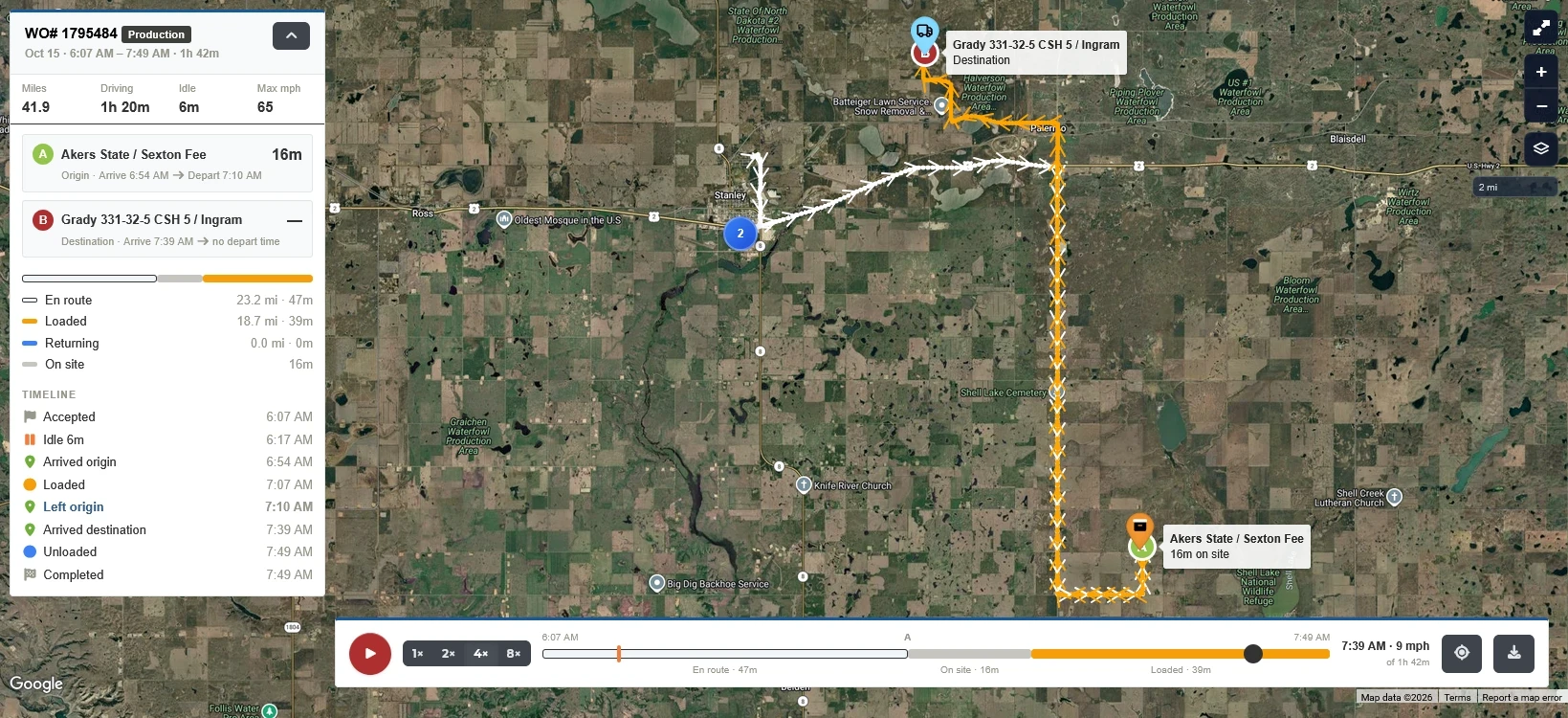
Replay a single load or a driver’s whole shift: every stop and how long the truck stayed. When an operator questions a load or a wait, you have the route and the time on site behind it, and you will know whether a driver was really in line at the SWD or parked down the road.
- Replay one load, or a driver’s entire shift
- Every stop, and how long the truck sat there
- Time on site at each origin and destination
- Loaded, empty, and on-site time broken out
- Miles, driving time, idle time, and top speed
Load reports for your customers
When an operator questions a load, send them the record
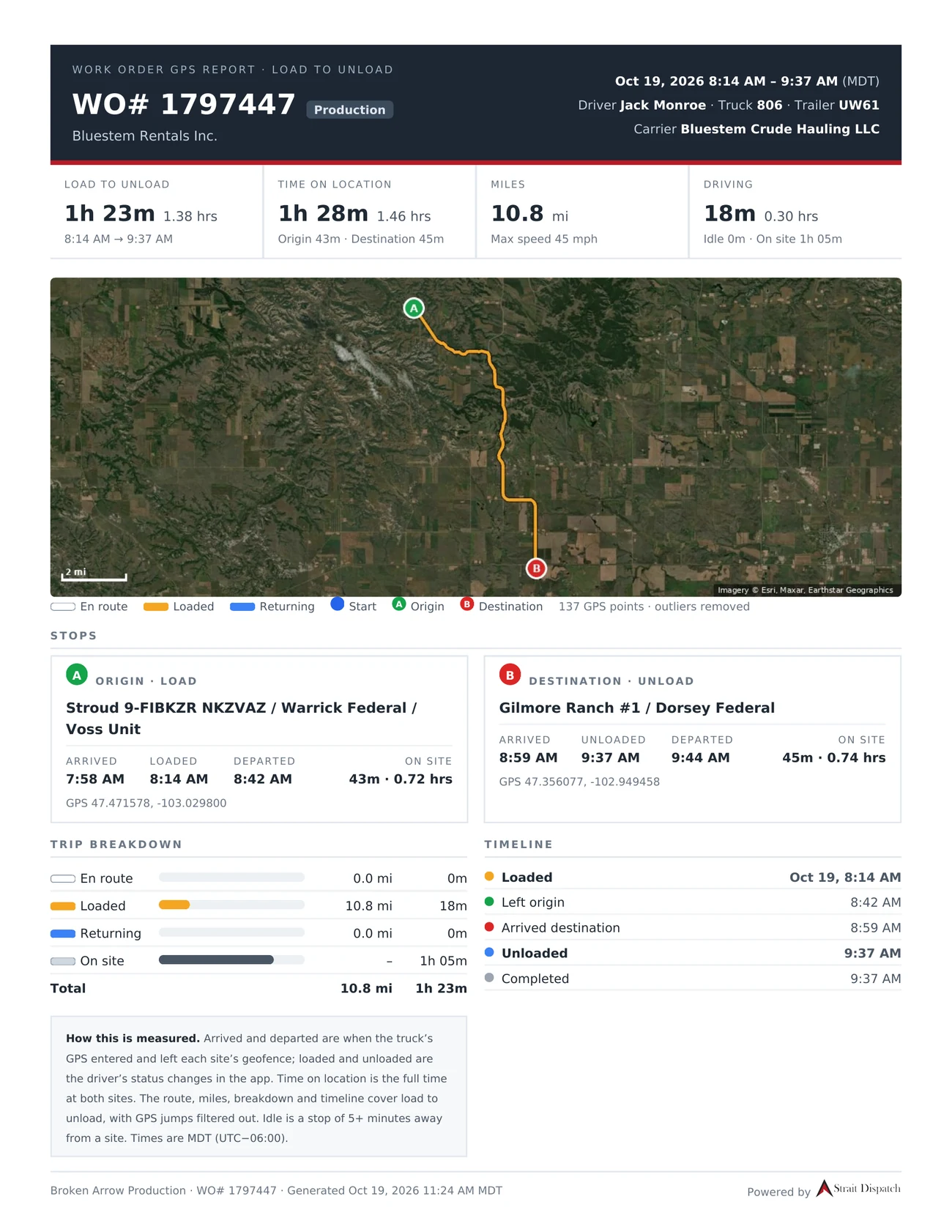
The operator says the truck sat too long at the SWD, or questions the time on a ticket. Send them a one-page report for that load, built from the work order’s own record: the route, when the truck got to each site and left, when it loaded and unloaded, and how long it stayed.
- The route on a map, from load to unload
- Arrived and departed at each site from the truck’s GPS, with loaded and unloaded from the driver’s app
- Time on location, miles, driving and idle time, and top speed
- A trip breakdown and a timeline of every status change
- How each number is measured, printed on the report
Certified routes
Routes that keep trucks off the wrong lease roads
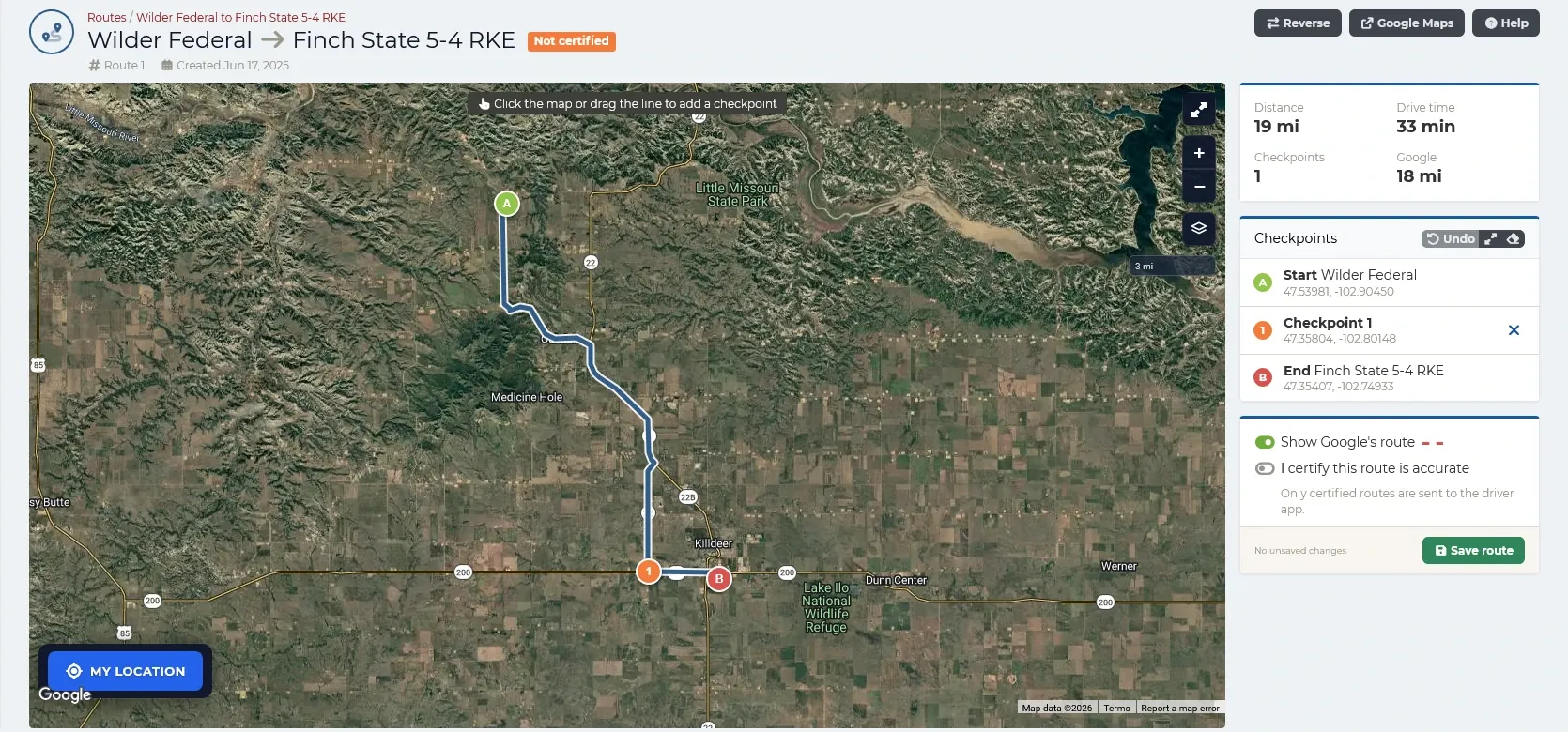
Build the route from the pickup to the drop-off, and click the map or drag the line to add checkpoints where it has to go. Compare its distance and drive time with Google’s route. Once someone certifies the route is accurate, it goes to drivers in the Driver app; routes nobody has certified are never sent.
- Checkpoints added by clicking or dragging the line
- Distance and drive time beside Google’s route
- Reverse a route for the trip back
- Only certified routes reach the Driver app
Road restrictions
Roads that are off limits, or only for lighter loads
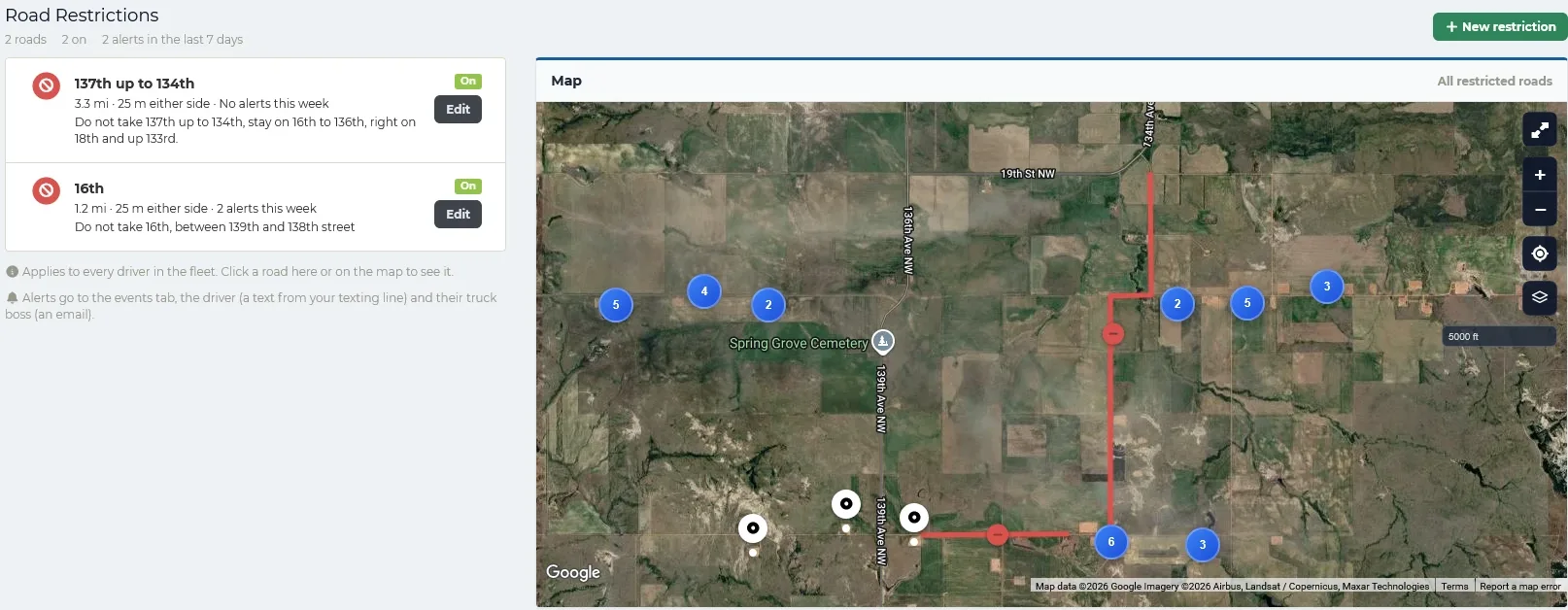
The county closes a road, or a landowner allows trucks through only under a weight limit. Draw the road on the map and mark it off limits to every driver, or set a load limit, such as 80 barrels or 12 tons. A limit is checked against what the driver is hauling at that moment, so an empty truck on its way back passes and a full one gets flagged.
- Off limits to everyone, or a limit per barrel, ton, or any other unit
- A text to the driver when they go on a restricted road
- An alert and a map of where they drove for their truck boss
- Every alert listed with the driver, truck, road, and work order
Time on site
Know which sites are slow before you send a driver
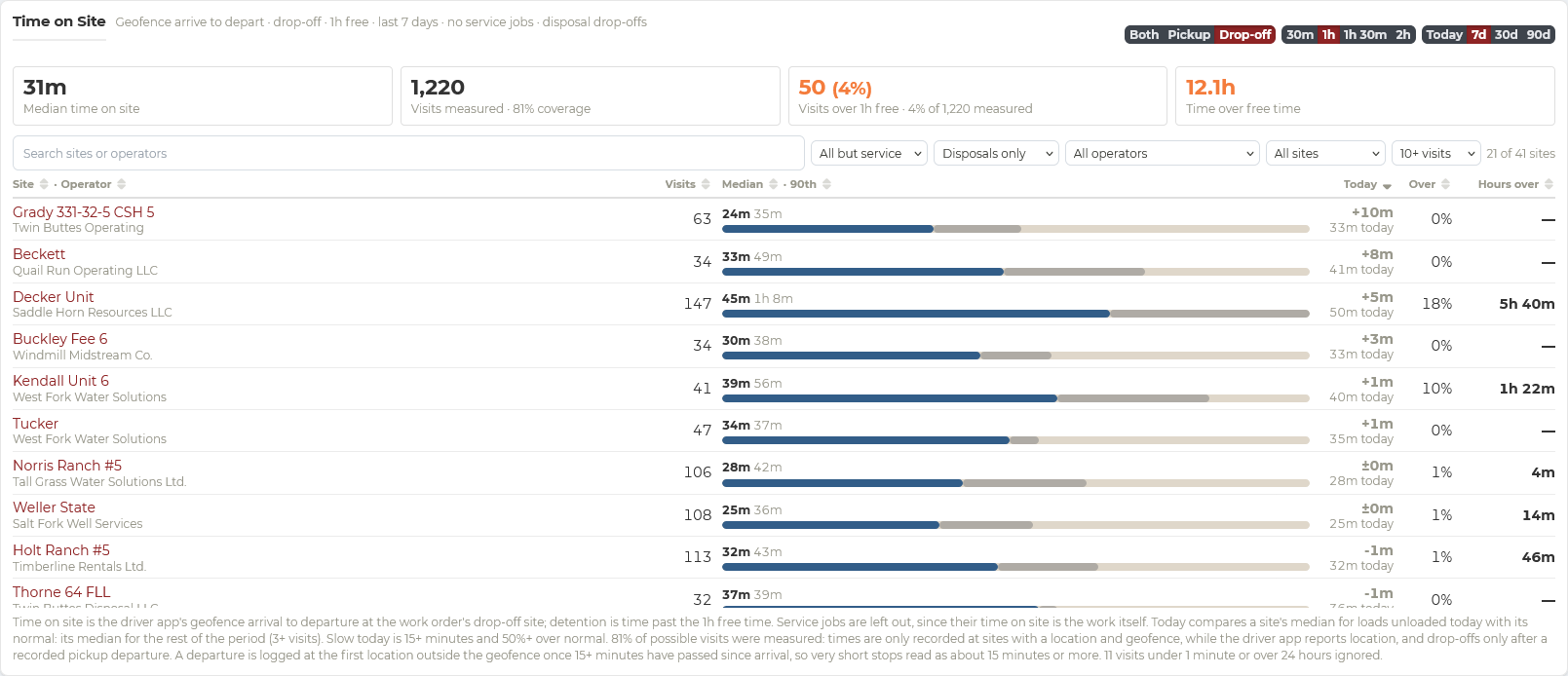
Is an SWD averaging three-hour waits today? Geofenced arrival and departure times show the median time at every pickup and disposal site, how today compares with normal, and which visits ran past the free time. Know before you dispatch, and send trucks where they will turn fastest.
When you bill by the barrel, every hour a truck sits in line to unload is an hour it is not hauling. Time on site shows where those hours go, and the detention you can take back to the operator.
- Median and 90th percentile time at each site
- Today compared with each site’s normal
- Visits and hours over the free time
- Pickup, drop-off, or both, by operator and site
Audit and billing
Know what is ready to invoice, and what is holding it up
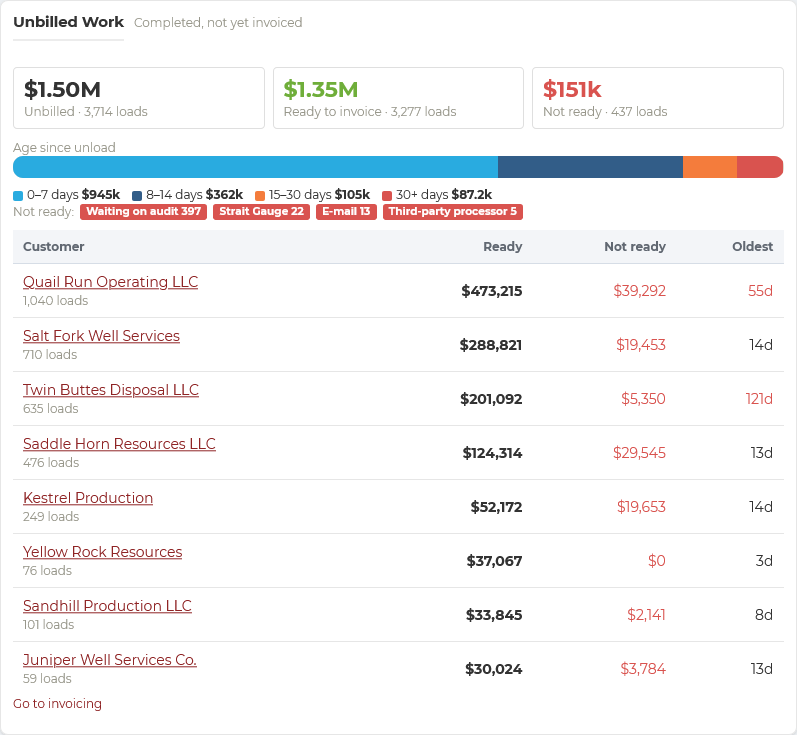
The unbilled work view splits completed loads into ready to invoice and not ready, with the reason: waiting on audit, a Strait Gauge reading, or a third-party processor. Every edit is logged in the work order journal, so audits are a review, not a reconstruction.
Built around your paperwork
Your safety forms, your tickets, your signatures
Set up the paperwork the way your customers and your safety program need it, then let the platform handle it on every load.
JSA builder
Job safety analyses tuned to each customer and job, or one for everyone
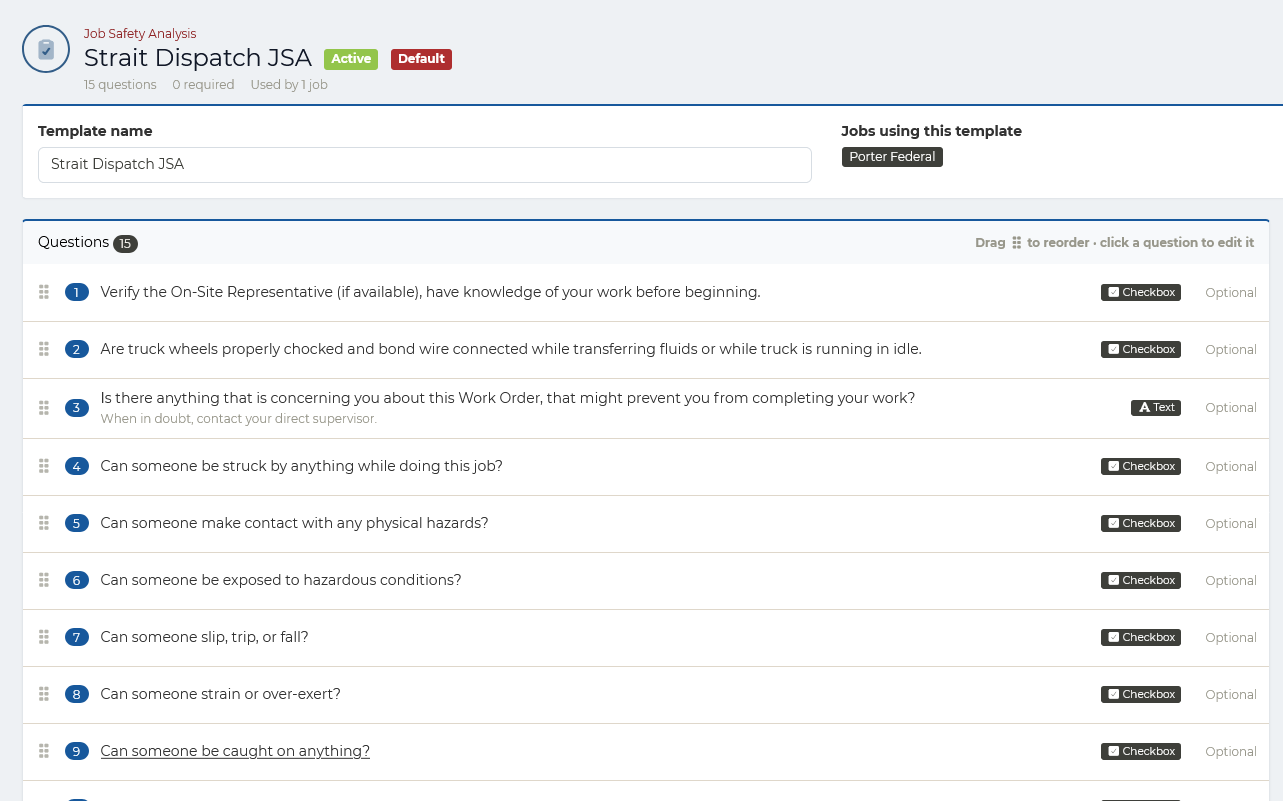
Build your own JSA templates and assign each one to the jobs it applies to. Jobs belong to customers, so a customer can have its own JSA, a single job can have a different one, and a default covers everything else. Add as many questions as you need, as checkboxes or written answers, with help text, required or optional, in whatever order you want. Drivers complete the JSA in the app before the work starts.
- Assigned to jobs, so each customer can have its own JSA
- A default JSA for everything else
- Checkbox and written-answer questions
- Required or optional, with help text for drivers
- Completed in the Driver app and kept on the work order
Document templates
Invoices, field tickets, and printed tickets that look the way you want
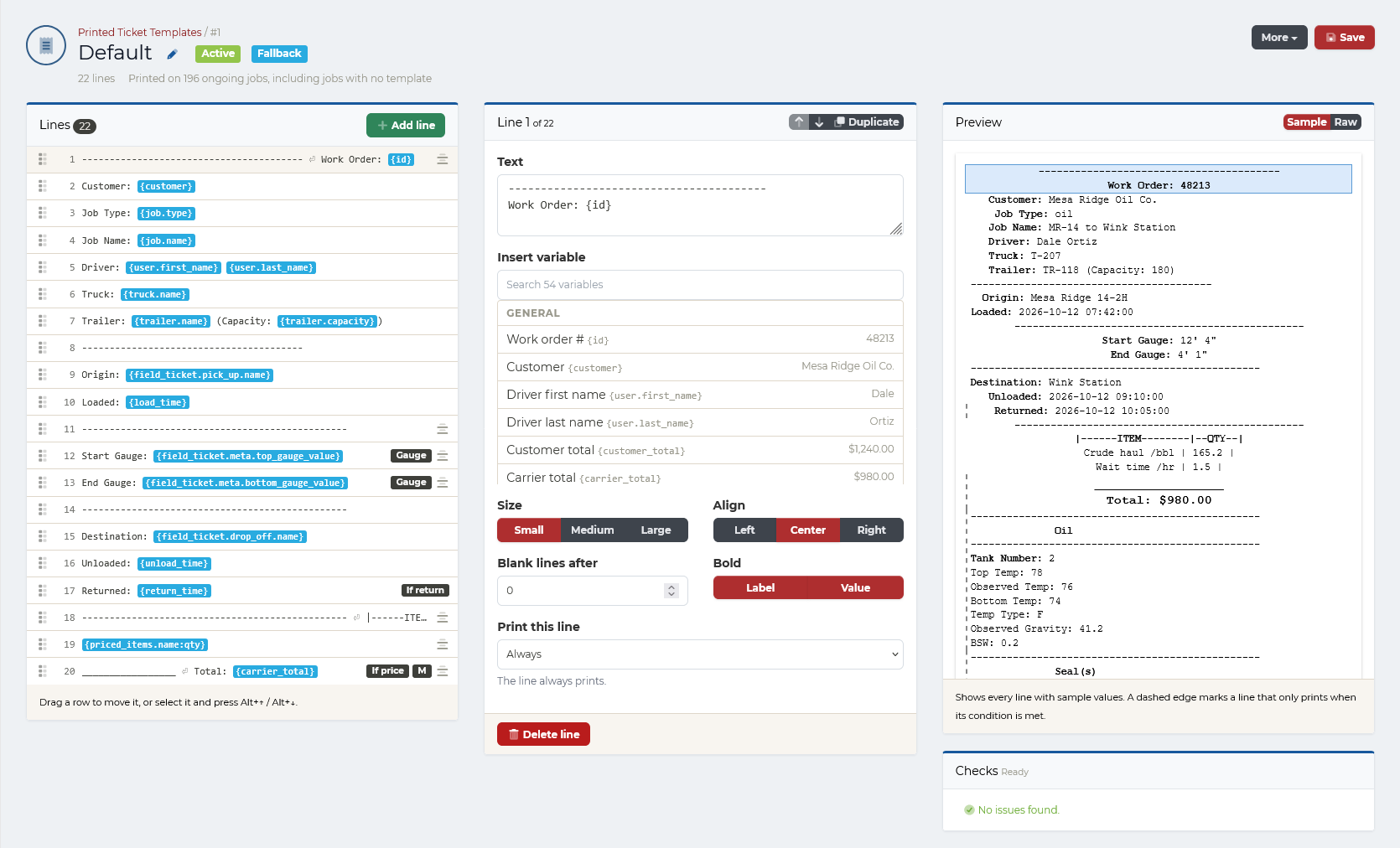
Design every document your operation produces: invoices, field tickets, printed tickets, and more. Choose what each line shows, insert work order values like customer, driver, gauges, and totals, set size, alignment, and bold, print a line only when it applies, and preview the result with sample data before it goes live.
- Templates assigned to jobs, with a fallback default for the rest
- Dozens of work order values to insert
- Lines that print only when their condition is met
- Live preview and checks before you save
Strait Sign e-signatures
Field tickets and invoices signed from the location
Send invoices, field tickets, and any other document to the company man or the operator with Strait Sign. They sign from their own link on their phone, and the sealed copy, with its audit trail and certificate of completion, stays attached to the work order for at least seven years.
- Invoices and field tickets sent for signature
- Signed from a phone, no account needed
- Audit trail and certificate of completion
- Kept for seven years or more
Also included
The rest of the platform works the same way for every fleet.
Hours of service
Hours left in each driver’s shift, with real clocks from Motive, Samsara, or Geotab.
Driver compliance: Hours of serviceDriver documents and DQ files
CDLs, medical cards, and full Driver Qualification Files, with notice before anything expires.
Driver compliance: Driver documents and DQ filesReports and dashboards
Revenue, utilization, and productivity dashboards, plus scheduled reports.
Reporting: Reports and dashboardsOilfield customer result
From a billing team to one person
“We went from a billing team of three to five people to one person managing more than 500 loads a day.”
Strait Gauge™
Trailer readings alongside the ticket
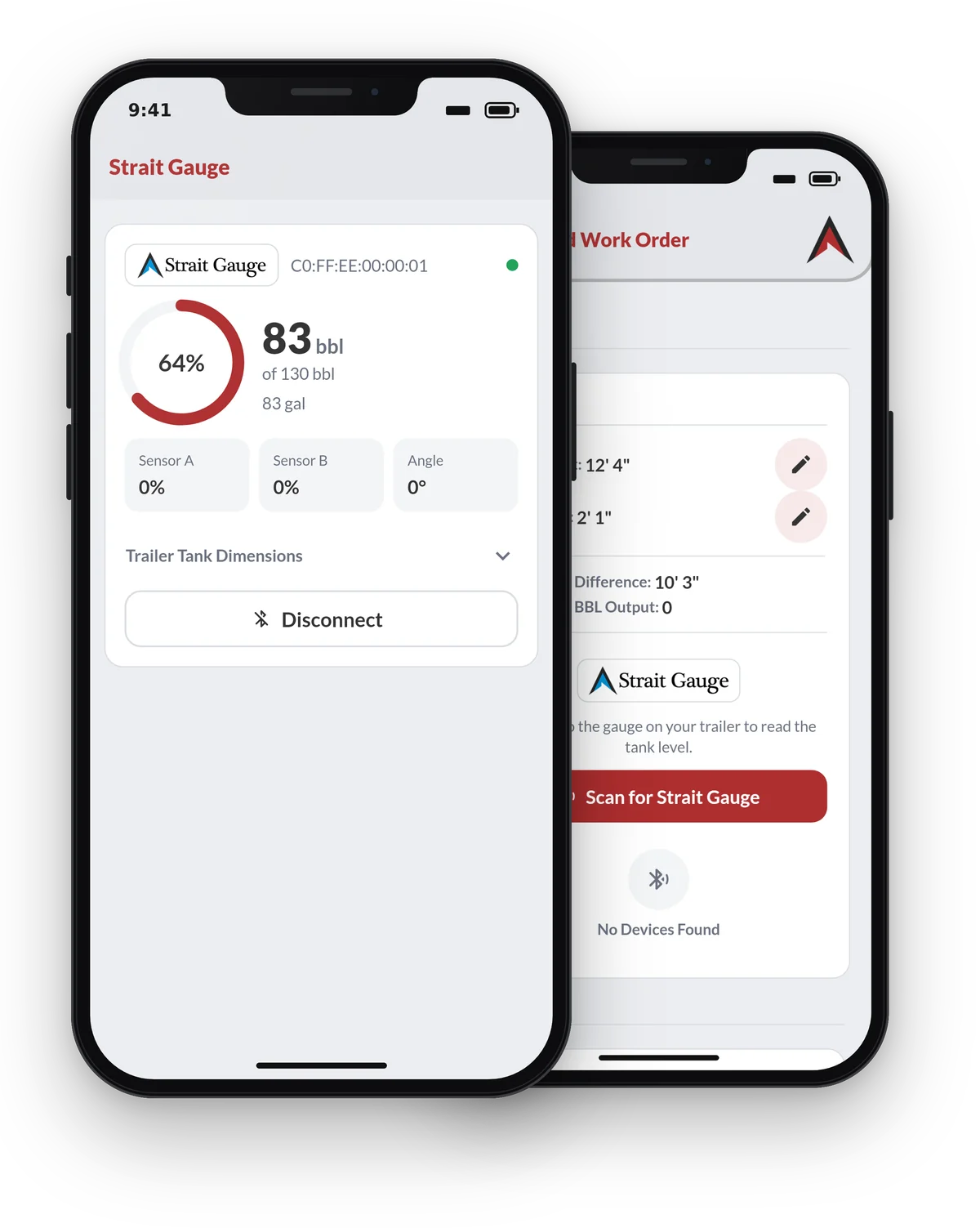
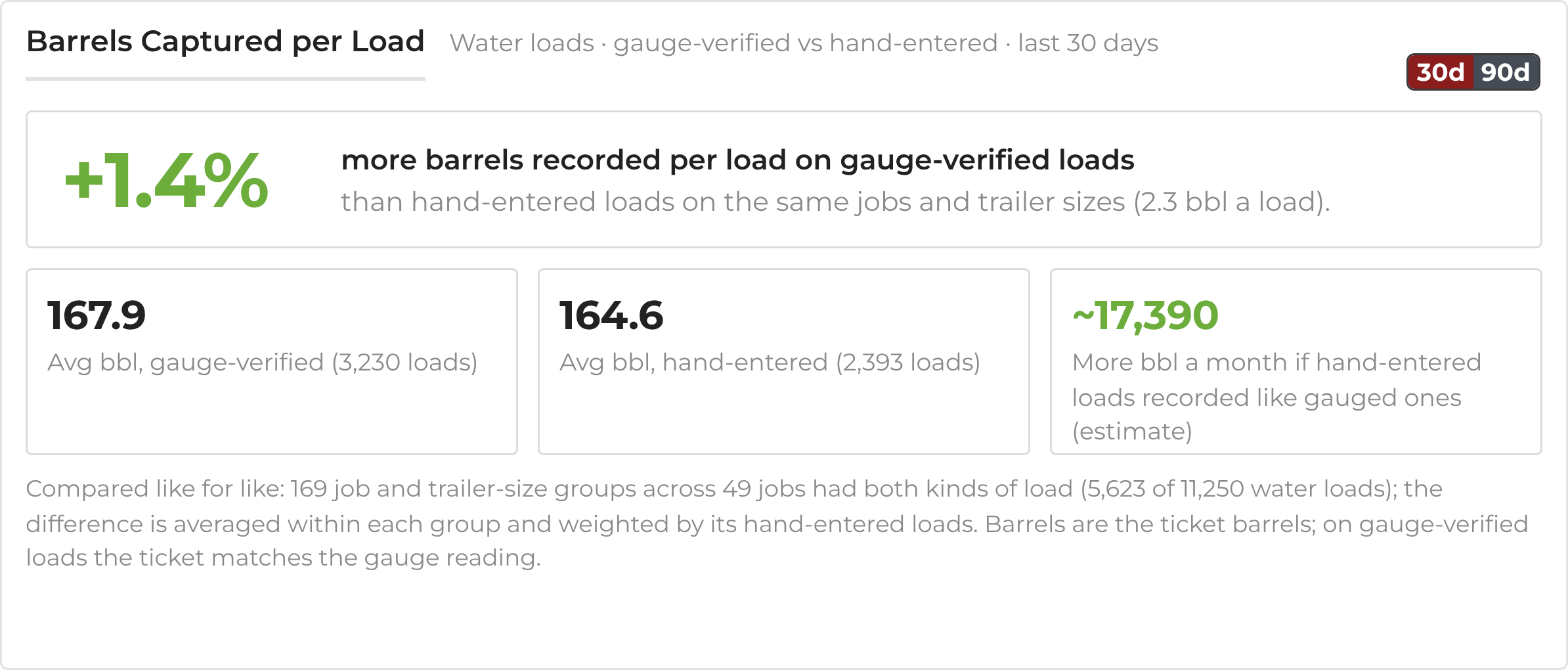
Strait Gauge™ integrates with Strait Dispatch to report what is in the trailer in real time. It alerts on load shifts during transit and shows whether a trailer arrived on site full or partially loaded.
Strait Gauge has its own upfront and monthly pricing. Ask about it during your demo, or call 1 (844) 970-1999.
Map your current workflow
Not ready for a full demo? Tell us how a load moves today, from work order to invoice, and we will show you where Strait Dispatch fits.
Water hauling questions
Can we dispatch contractor trucks alongside our own fleet?
Yes. Work orders can be assigned to your own drivers and trucks or to contractor carriers, and contractor work can be tracked through to settlement.
Can we separate our fleet into divisions?
Yes. Set up divisions with their own icons and colors so dispatchers can tell segments of the fleet apart on the map at a glance.
Do drivers need a separate GPS device?
No. The Strait Dispatch Driver app has GPS built in. If your trucks already run Motive or Samsara, Strait Dispatch can use location from those instead. See integrations.
Does the Driver app work without cell signal?
Yes. The Driver app keeps working with no signal: drivers record tickets and status changes as usual, and the app keeps logging the truck’s GPS. Everything is saved on the phone and sent to Strait Dispatch as soon as it reconnects, so a dead zone on a lease road doesn’t leave a gap in the record.
How do drivers get started?
Drivers download the Strait Dispatch Driver app from the App Store or Google Play and sign in to your fleet. See download the apps.
Is there a limit to how many trucks we can run?
No. There is no hard limit to the number of trucks, carriers, or drivers managed under one fleet. See pricing.
What does Strait Gauge add?
Strait Gauge™ reports trailer contents to Strait Dispatch in real time, alerts on load shifts in transit, and shows whether a trailer arrived full or partially loaded. Gauge readings can be matched to the load ticket. Learn more at straitgauge.com.
More answers on the FAQ page.
See your water hauling workflow in Strait Dispatch
We will set up the demo around your jobs, disposal sites, and billing.
No credit card required for the free trial.