

Driver compliance and DQ files
Driver qualification files that keep themselves current
Keep every driver’s DQ file, drug and alcohol records, and hours of service in the same system you dispatch from. Strait Dispatch shows what is missing or coming due, sends the paperwork out for signature, and can stop a load going to a driver who is not qualified.
Free trial, no credit card required. Already a customer? Fleet Manager Login
Driver Qualification File (FMCSA 391.51)
Start from the DQ template, then make it yours
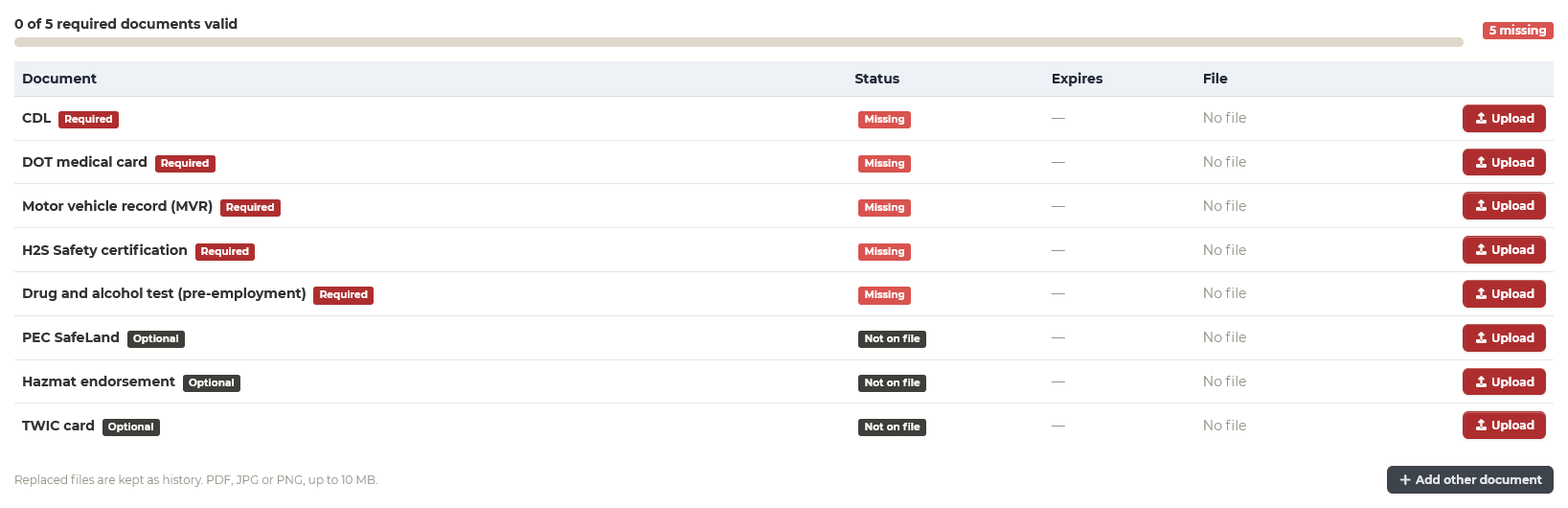
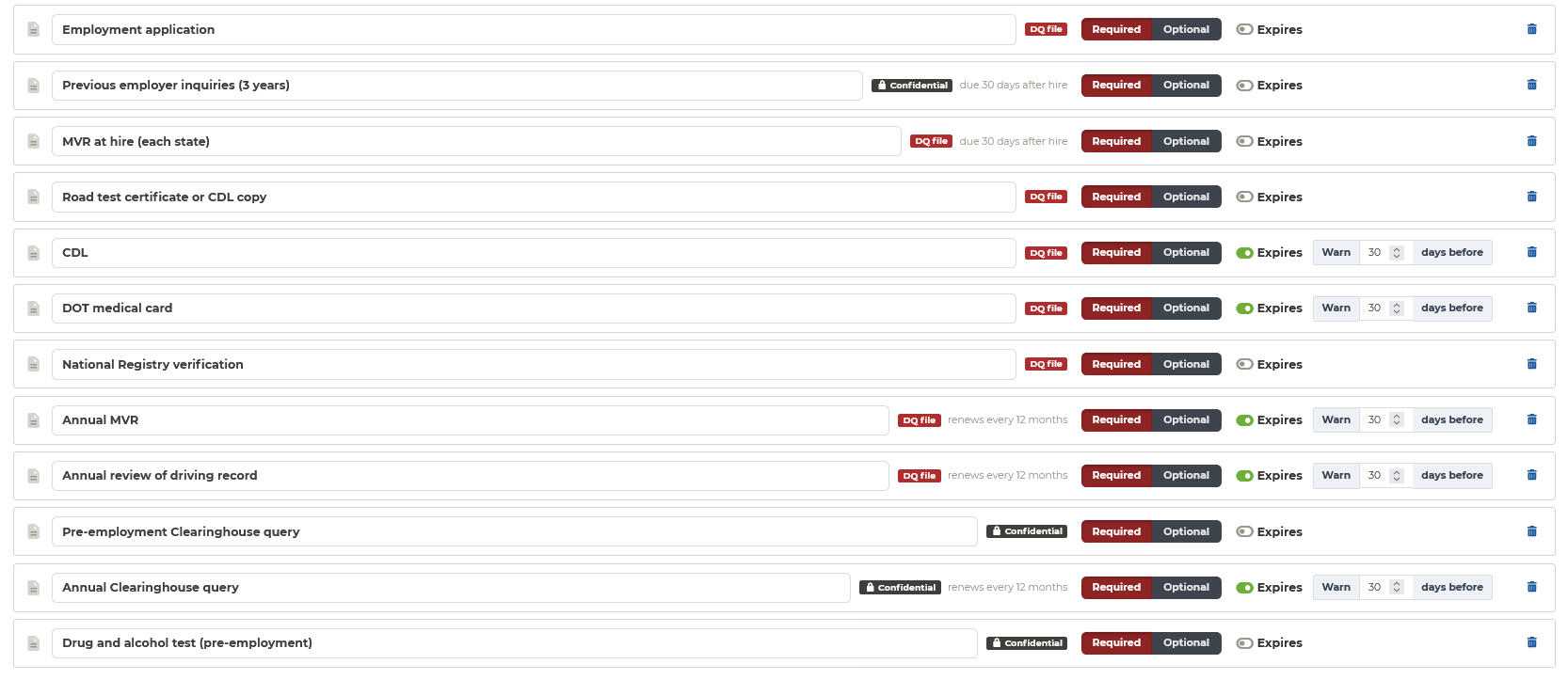
Turn on the Driver Qualification File for a carrier in one click. Each document knows whether it expires, renews every year, or is due within 30 days of the hire date, and every driver’s Documents tab shows what is on file, what is due, and what is missing.
- Employment application, previous employer inquiries, MVRs, road test or CDL copy, medical card, and National Registry verification
- Annual MVR and annual review that renew themselves every 12 months
- Documents due within a set number of days of the hire date
- Pre-employment and annual Clearinghouse queries, and drug and alcohol tests, kept as confidential records
- Hire and termination dates, with the date the file can be destroyed three years after termination
- Required or optional, warning windows, and your own extra documents
Print the DQ file
One PDF for each driver: a cover sheet with every requirement and its status, then every document behind it, ready for an auditor.
Export every driver
Every DQ file for a carrier, active drivers and those terminated within three years, emailed to you as one download.
Confidential records
Drug and alcohol records and previous employer responses are seen, downloaded, and exported only by owners and admins.
Reminders before it lapses
A daily email to owners and admins lists each document that is expiring, expired, due after hire, or missing, once per stage.
Employment verification
Previous employer verifications, signed and filed for you
Stop faxing safety performance history requests and chasing them by phone.
Send the request
Enter the previous employer and the dates the driver gave you, from the driver’s Documents tab.
The driver signs the release
By email or text, or mark the release as already on file.
The employer answers
Employment, accidents in the last three years, and the 49 CFR 40.25 drug and alcohol questions, from a link on any device.
Filed in the DQ file
The signed, sealed copy goes into the driver’s file, with every employer’s answer kept together.
Built on Strait Sign
Your form, your layout
The verification is a document like your invoices and field tickets: use our form, or design your own in the template editor, with the fields each person fills in placed where you want them. Every request has an audit trail and a certificate of completion.
- Driver release and employer answers in one signed document
- Reminders until it is answered
- Annual review of driving record done as a guided form, filed in the DQ file when it is completed
At dispatch
Catch it at dispatch, not at the roadside inspection
Compliance works best where the work is assigned.
Warn or block
When a load goes to a driver whose DQ file has an expired or missing document, or who is marked terminated, dispatch sees why. Each fleet chooses warn, block, or off.
Hours of service
Each driver’s rule set, their clocks from Motive, Samsara, or Geotab (or an estimate from the Driver app), alerts as they near their limit, and a warning before you dispatch a driver in their last hour.
Road restrictions
Draw the roads drivers must stay off, or that have load limits. Drivers see them in the app, and you get an alert and a map if a truck goes on one.
Inspections and JSAs
Start- and end-of-shift inspections for each type of equipment, and job safety analyses completed in the app before work starts.
Also included
Trucks, trailers, and carriers too
Truck and trailer documents
Registration, annual DOT inspection, insurance cards, IFTA and IRP, and tank inspections, tracked with notice before they expire.
Maintenance
Service schedules by days, miles, or engine hours, with odometer and engine hours read from your ELD.
Carrier compliance
Insurance and required documents for every contractor carrier, with onboarding through MyCarrierPackets and monitoring through RMIS.
Integrations: Carrier complianceDriver compliance questions
What is a driver qualification file?
A driver qualification (DQ) file is the set of records FMCSA requires a motor carrier to keep for each CMV driver under 49 CFR 391.51: the employment application, motor vehicle records, the road test certificate or CDL copy, the medical examiner’s certificate, previous employer inquiries, and the annual review of the driving record. It has to be kept while the driver works for you and for three years after they leave.
Do we have to use the DQ template?
No. Document requirements are set per carrier. Turn on the Driver Qualification File template for the carriers that need it, keep your own list for others, and add, rename, or remove any document. Contractor carriers can have their own requirements too, if you want to monitor them.
Who can see drug and alcohol records?
Drug and alcohol records, Clearinghouse queries, and previous employer responses are kept as confidential records. Only owners and admins can see, download, or export them; everyone else sees only that a confidential record is missing or expired.
How does the employment verification work?
From the driver’s Documents tab, enter the previous employer’s contact details and send. The driver signs the release first, or you mark it as already on file. The previous employer then answers the safety performance history questions, and the 49 CFR 40.25 drug and alcohol questions if you ask them, from a link on their phone or computer. The signed copy is filed in the driver’s DQ file automatically. The form is your own: use ours, or design your own layout in the template editor.
Can Strait Dispatch stop a load going to a driver whose file is not complete?
Yes, if you want it to. Each fleet chooses whether dispatch warns, blocks, or ignores a driver whose DQ file has an expired or missing document. Warn is the default.
Does this make us FMCSA compliant?
It helps you keep complete, current records and shows you what is missing before it becomes a problem, but compliance stays your responsibility. Check your obligations with your safety consultant or the FMCSA regulations.
See your drivers’ files the way an auditor would
We will set up the DQ template with a few of your drivers in your demo and show you what is missing.
No credit card required for the free trial.